


bitSplit   iFuntastic   Video Guides   Problems and Solutions  


 iFuntastic 6  for iPhone, iPod touch and Macintosh

  Better a diamond with a flaw than a pebble without.
  -Confucius


Terminology

Device

In this context, device means any iPhone or iPod. Unless I'm referring to something that is specific to one or the other (phone calls, for example,) the following terms all mean the same thing: device, phone, iPhone, iPod, miracle machine :-)

Jailbreak, Jailbroken, Unshackled, Shackled, Pwnage Tool

Jailbreaking means using tools developed by the hacker community to make the phone's file system accessible for reading and writing. The main tools available is the Pwnage Tool. After running the tool, you will find Cydia.app on your phone. With it you can add third-party applications, utilities, wallpapers and more to your phone. Your phone is now jailbroken.

With a service called ssh, you can transfer files to and from the phone, however, ssh requires a WiFi connection. To access the file sytem over a USB cable we need the AFC2 service enabled on the phone - the jailbreak does so. Once AFC2 is available, iFuntastic can read and write to the phone - let's now call it unshackled.

Unlocking, Activating, Baseband, Bootloader

Unlocking refers to changing the phone so it works with any carrier. This is, shall we say, frowned upon by Apple and the phone companies. iFuntastic does not unlock or activate or modify any phone-related firmware.
It enters the picture once you have an unshackled device.
Back to Top

Overview

iFuntastic is an application for Macintosh which lets you customize your iPhone or iPod.

Its foundation is a file manager for the phone's file system. Other features build on that to allow easy modification of text, settings, sounds and especially graphics which make up the phone's user experience.

Some functionality is available to out-of-the-box phones (custom ringtones and copying your own files to and from the phone.) The 'good stuff' requires the phone to be jailbroken and unshackled. Please read the Terminology section, if you haven't done so.

Once your phone is unshackled, you can install iFuntastic Support. This is a set of files and tools which iFuntastic uses to do its magic. Anything that iFuntastic does can be undone by restoring the phone in iTunes.

iFuntastic's features can be broadly divided into the following categories:

Setup & Troubleshooting  
  • provides links to jailbreaking tools and guidance for jailbreaking and unshackling
  • the device list displays information about all connected devices
  • guided restart of the phone and guided entering DFU mode for restoring
  • change the ssh password
  • install, update and uninstall iFuntastic Support
    • Son of iFuntastic lets you switch themes and home screen layouts on the phone
    • applies a patch that allows addition of ringtones to the standard (built-in) list

File Manager, iFundex and Graphinder™
  • File Manager  

    transfer data with drag and drop
    • between disk and device
    • from device to device
    • from device or disk to the trash
    • drag graphics and sounds from iTunes, iPhoto or Safari onto the device
    • replace - leave the file name as it is and substitute only the data

    inspect
    • image thumbnails
    • file sizes and image dimensions
    • permissions and modification dates
    • listen to system sounds

    convert
    • special PNG format to one that's readable and editable on the computer
    • binary property lists into ASCII for viewing and editing
    • sound files into AIF format
    • voicemails (.amr) into AIF format - add your voicemail to iTunes
    • .wav .mp3 .m4a .mov .aif .caf into system sound or ringtone format

    edit
    • file and folder permissions
    • file and folder names
    • images - image editor with overlay and mask layers, rotation, scaling, shearing, mirroring
      adjust hue, lightness and saturation; colorize or desaturate
    • text - text editor for text and xml files
    • property lists - edit individual settings
    • sounds - sound editor with cropping, volume, fade-in and fade-out adjustment

  • iFundex
    • index of all files and folders on the device
    • filter by image dimensions or file name or extension (file type)
    • full text index - search within files for settings or user interface strings
    • save backup of all files and folders on the device to disk

  • Graphinder™
      a search function for images:
    • watermark all graphics on the phone
    • take a snapshot
    • iFuntastic will identify the location of the graphics files on the device

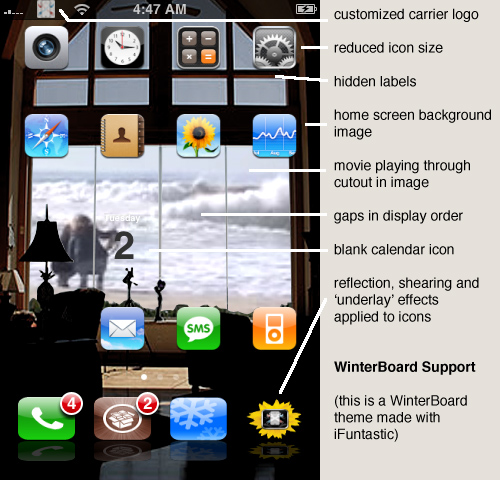
WinterBoard Support
  • build your own WinterBoard themes
  • easily create application icon themes
  • customize previously unaccessible UI graphics
  • play movies on your home screen

The Bit Pit (these functions also work on shackled phones!)
  • simplified copying of your own files to and from the phone
  • copy iTunes music off the phone
  • add custom ringtones
  • copy screenshots off the phone
  • add images to the camera roll for use as wallpaper
  • convert text files to image sequences and add them to the camera roll -
    the poor man's, no frills whatsoever e-book reader
and if your phone is unshackled:
  • copy notes off the phone
  • add text files as your own notes to the Notes database
  • copy text messages off the phone

Son of iFuntastic
  • iFuntastic on the phone
  • switch between your own themes and home screen layouts (see below)
  • utilities to restart the SpringBoard, reboot the phone and reset the home screen

E-mail Signatures
  • edit the 'Sent from my iPhone' string to include graphics and web addresses
  • add different signature 'themes' and switch between them on the fly

Carrier Logos
  • replace the default logo with an image of your choice
  • or use a short text string as your logo

Ringtones
  • add your own ringtones to the standard (built-in) or custom ringtone lists
  • .wav .mp3 .m4a .mov .aif .caf format files can be used
  • sound editor with cropping, volume, fade-in and fade-out adjustment

Screenshots
  • import screenshots taken with the built-in screenshot function

Home Screen  


Note: this functionality is not compatible with the built-in rearranging of icons
it won't hurt, but it won't be pretty, either...
  • arrange icons on the home screen any way you like
  • have gaps in between icons, make the icons smaller or hide them
  • put a background image on your home screen - it can span 9 pages for a panoramic effect!
  • replace application icons
Back to Top

What you should know before using iFuntastic - Please Read

Thank you to all my supporters!
You help make iFuntastic better and better.

iFuntastic's primary focus (from the very start) has been customizing your phone or iPod.

I know next to nothing about unlocking, activation or even the internals of jailbreaking (which I stubbornly call unshackling :-) Thanks to the great work of the hacker community this process is becoming almost routine, and I am now leaving it up to the experts.

Due to all the different tools, hardware, firmware and software configurations and operating sytems, iTunes and frameworks, it's impossible for me (or anyone else, for that matter,) to guarantee that anything works as it should! Let's keep in mind that there is no support from the mothership - the real experts.

I shall deal with you in good faith, try my best to make it work as advertised and to keep up with the latest developments, but you use iFuntastic at your own risk!
(A 'Restore' with iTunes should let you recover from any serious unpleasantness.)

I have limited resources - especially time - and I am fighting a losing battle to provide adequate documentation. Please read the documentation that is provided carefully.

I humbly ask you to forgive bugs, inaccuracies, glitches and awkward implementations. Please report any problems you find. I may not be able to help you, but I may be able to fix them in future versions!

Thank you!

Back to Top

Minimum Requirements
  • iPhone or iPod touch with firmware 2.0.2 (version b005) or 2.1 (version b006)

  • Macintosh computer - Intel or PowerPC (PPC); OS X Tiger or Leopard
  • Display size 1280 x 800 - bigger is better
  • 1GB or more of disk space
  • Internet access

  • iFuntastic presently is available in English only
Back to Top

Purchasing

iFuntastic is a free download.
Troubleshooting and firmware functions (except iFuntastic Support) are free as well.
All other functions require you to purchase the features which include everything iFuntastic is capable of.
A 3 Day Trial of the full version at a reduced price is available.

You make purchases from iFuntastic's Feature page.
Payments are handled through PayPal, but an account is not required.
Once I receive a payment notification, I will enable your features on the bSE server.
iFuntastic in turn will enable the features when it receives the correct information from the server.
Official PayPal Seal
Back to Top

Privacy and Personal Data

iFuntastic uses the serial number of the connected device to generate a user ID.
The user ID identifies your device to bSE to enable your purchased features.
The serial number cannot be extracted from the user ID.

iFuntastic periodically queries the bSE server about the business and feature status.
It does not transmit any data that is collected by bSE.

Any personal information that you provide in emails, bug reports or through your PayPal purchases is used only for purposes of communicating with you and fixing possible problems.
It will not be shared with or sold to anyone else!
Back to Top


Visitor #:


©2008 bitSplit™ Enterprises.
All trademarks and copyrights remain the property of their respective owners.
iTunes, iPhone, iPod and Macintosh are products and/or trademarks of Apple, Inc.
This site is not associated with, authorized, sponsored, or otherwise approved by Apple, Inc.

Last updated September 16th 2008